Nordvpn offline installer your guide to hassle free installation

Editor's pick: NordVPN — fast, secure VPN — Strong encryption, a no-logs policy and apps for every device. 30-day money-back guarantee. Get NordVPN →
Nordvpn offline installer your guide to hassle free installation is all about giving you a straightforward path to get NordVPN up and running without needing a live internet connection for the install. Quick fact: offline installers are handy when you’re on a restricted network or need to deploy across multiple devices with limited bandwidth. Below you’ll find a practical, easy-to-follow guide, plus tips, frequently asked questions, and resources to keep you secure.



| VPN | Obfuscation | From / month | Plan | Free plan | Refund | Alipay | UnionPay | Crypto | Website opens in China | Trustpilot | |
|---|---|---|---|---|---|---|---|---|---|---|---|
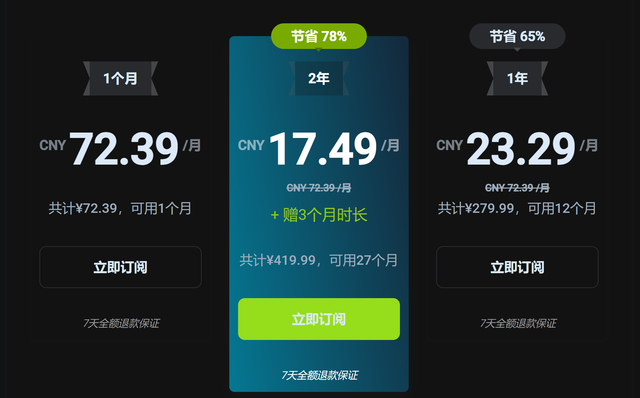
 NordVPN | Turn on manually Obfuscated Servers / NordWhisper | $3.49/mo | 27 months: $94.23 | No | 30 days | ? | ✗ | ✓ | ✓ | ✗ Blocked | 4.2/5 (51,628 reviews) |
 ZoogVPN | Turn on manually Shadow | $2.49/mo | 27 months: $59.99 | Yes | 7 days | ✓ | ✓ | ✓ | ✓ | Official site blocked; our special link opens (4.4 s) | 4.2/5 (195 reviews) |
 ExpressVPN | ✓ On by default all servers | $3.00/mo | 28 months: $84 | No | 30 days | ✗ | ✗ | ✓ | ✗ | ✗ Blocked | 4.4/5 (29,706 reviews) |
 Surfshark | ✓ On by default Camouflage, with OpenVPN | See site | See site | No | 30 days | ✗ | ✗ | ✗ | ✓ | ✗ Blocked | 4.3/5 (31,823 reviews) |
 Proton VPN | Turn on manually Stealth, free plan too | $2.99/mo | 12 months: $35.88 | Yes | 30 days | ✗ | ✗ | ✗ | ✓ | ✗ Blocked | 2.1/5 (1,040 reviews) |
 Astrill VPN | Turn on manually StealthVPN / OpenWeb | $12.50/mo | 24 months: $300 | No | See site | ✗ | ✗ | ✗ | ✓ | ✗ Blocked | 1.3/5 (110 reviews) |
 Private Internet Access | Turn on manually Shadowsocks, OpenVPN only | $2.03/mo | 40 months: $81.2 | No | 30 days | ✗ | ✗ | ✗ | ✗ | ✗ Blocked | 4.2/5 (11,033 reviews) |
 CyberGhost | Turn on manually selected servers | $2.19/mo | 28 months: $61.32 | No | 45 days | ✗ | ✗ | ✗ | ✓ | ✗ Blocked | 4.0/5 (24,178 reviews) |
 PureVPN | Turn on manually switch to OpenVPN | $1.69/mo | 60 months: $101.55 | No | 31 days | ? | ? | ✗ | ✓ | ✗ Blocked | 4.4/5 (17,994 reviews) |
 AdGuard VPN | ✓ On by default TrustTunnel | $2.99/mo | 24 months: $71.76 | Yes | 30 days | ✓ | ✗ | ✓ | ✓ | Official site blocked; our special link opens (3.7 s) | 4.3/5 (290 reviews) |
 Mullvad | Turn on manually QUIC / Shadowsocks / LWO | $5.61/mo | €5/mo | No | 14 days | ✗ | ✗ | ✗ | ✓ | ✗ Blocked | 3.2/5 (192 reviews) |
 Windscribe | Turn on manually Stealth / WStunnel | $5.75/mo | 12 months: $69 | Yes | See site | ✗ | ✗ | ✗ | ✓ | ✗ Blocked | 4.7/5 (13,355 reviews) |
 StrongVPN | Turn on manually Scramble, OpenVPN TCP | See site | See site | No | 30 days | ✓ | ✗ | ✗ | ✗ | ✗ Blocked | 4.4/5 (2,695 reviews) |
 LightXtreme 闪连 | Not listed | $7.08/mo | 12 months: $84.99 | Yes | 30 days | ✓ | ✓ | ✓ | ✓ | ✓ Yes (3.5 s) | No page |
Prices checked 2026-11-10 on each vendor's pricing page (cheapest long plan, USD). Check the vendor's checkout for the final price.
Obfuscation checked 2026-11-14 on each vendor's site and help center: "on by default" = nothing to set; "turn on manually" = switch protocol or mode in settings; "not listed" = the vendor describes no obfuscation.
Payment methods checked 2026-11-10 on each vendor's payment pages: all 14 take cards and PayPal; ✗ = not listed, ? = the vendor's own pages disagree.
China access: whether the official website opens from mainland China networks (tests the website only, not the VPN connection). Last checked 2026-11-18 01:02 Beijing time.
Trustpilot score and review count checked 2026-11-10.
- Quick fact: An offline installer lets you install NordVPN without an active internet connection, then connect once you’re online.
- What you’ll get in this guide:
- Step-by-step offline installation process
- System requirements and compatibility notes
- Post-installation setup and best practices
- Troubleshooting tips and common issues
- Frequently asked questions with clear answers
- Why this matters: A hassle-free install saves time, reduces friction on secured networks, and makes mass deployments smoother for IT admins.
- Quick start steps summary:
- Download the offline installer on a device with internet access
- Transfer the installer to the target device USB, external drive, or shared network
- Run the installer and follow on-screen prompts
- Open NordVPN, log in, and configure settings
- Verify your connection and test leak protections
- Useful resources unlinked text here for readability:
- Apple Website - apple.com
- Artificial Intelligence Wikipedia - en.wikipedia.org/wiki/Artificial_intelligence
- NordVPN Support - support.nordvpn.com
- NordVPN Downloads - nordvpn.com/downloads
- VPN Security Guide - vpnsecurity.org
What is an offline installer and why use it?
- An offline installer contains all necessary files to install the software without needing to download during the setup. This is perfect when you’re on a restricted network, traveling, or deploying to many devices.
- Benefits:
- Faster deployment on multiple machines
- No dependency on a live internet connection during install
- Better control in enterprise or school networks
- Fewer interruptions from slow or unstable connections
- Typical use cases:
- IT departments rolling out VPNs in dorms or offices
- Remote workers with limited connectivity
- Emergency setups after network outages
Prerequisites and compatibility
- Supported operating systems:
- Windows 10/11 64-bit
- macOS 10.15+ Catalina and newer
- Linux distributions with GUI support varies by distro
- Mobile platforms typically require online download, but many devices support offline package transfers
- Hardware requirements:
- Modern CPU, at least 2 GB RAM 4 GB recommended
- Sufficient disk space roughly 100–200 MB for the app, plus cache
- Account requirements:
- An active NordVPN account subscription and login credentials
- Network considerations:
- Some networks block VPN traffic; ensure the network policy allows VPN connections
- If using a corporate network, check with IT for installation permissions
Step-by-step offline installation guide
Step 1: Prepare the offline installer from a machine with internet access
- Visit NordVPN’s official site or trusted sources to download the offline installer package for your OS.
- Choose the correct version Windows, macOS, Linux. If you’re deploying across multiple OS types, grab each one you need.
- Save the file with a clear name, e.g., NordVPN_Offline_Windows.exe or nordvpn-offline.deb for Linux.
Step 2: Transfer the installer to the target device
- Use a USB drive, external hard drive, or a local network share.
- Verify the file integrity check hash if provided by NordVPN to ensure the package isn’t corrupted during transfer.
Step 3: Install NordVPN offline
- Windows:
- Run the .exe file as Administrator
- Follow the on-screen prompts
- If prompted for permissions, allow the installer to modify your system
- macOS:
- Open the .dmg or .pkg file
- Drag NordVPN to the Applications folder or run the installer
- Linux:
- Open a terminal
- Use the appropriate package manager command, for example:
- Debian/Ubuntu: sudo dpkg -i nordvpn-offline.deb
- Red Hat/CentOS: sudo rpm -i nordvpn-offline.rpm
- Resolve dependencies if prompted: sudo apt-get install -f for Debian-based
- If you encounter “unable to locate dependencies,” note them and install missing components after connecting to the internet as a last resort.
- Windows:
Step 4: Activate and sign in
- Launch NordVPN from your applications menu.
- Sign in with your NordVPN account credentials.
- If you have a license key, you can enter it during setup if prompted.
Step 5: Configure basic settings Youtube app not working with vpn heres how to fix it: Quick Fixes, Best VPNs, And Pro Tips 2026
- Default protocol: typically OpenVPN or WireGuard NordLynx
- Auto-connect: enable on startup for always-on protection
- Kill switch: enable to prevent data leaks if VPN disconnects
- DNS leak protection: ensure enabled
- Obfuscated servers: enable if you’re in networks with VPN blocking
Step 6: Test your connection
- Connect to a server in a nearby country for speed testing
- Visit a site like ipinfo.io to verify your IP address and location has changed
Step 7: Create a deployment profile for IT admins
- Document preferred servers, protocols, and login methods
- Save a standard configuration file if NordVPN supports it for auto-configuration
Troubleshooting common offline install issues
- Issue: Installer won’t run
- Solution: verify you downloaded the correct package for your OS and run as Administrator Windows or with sudo Linux
- Issue: Activation fails after offline install
- Solution: ensure you have a valid NordVPN account; try logging in on a device with internet to confirm credentials
- Issue: DNS leaks detected after install
- Solution: recheck DNS settings inside NordVPN and enable DNS leak protection
- Issue: Kill switch not engaging
- Solution: re-enable in settings and test with a short disconnect
- Issue: Slow connection after connection
- Solution: try different servers, update the app, or switch to a lighter protocol like WireGuard
- Issue: Update required but no internet
- Solution: offline updates are typically not possible; you’ll need an internet-enabled session for updates
- Issue: VPN blocks on corporate networks
- Solution: use obfuscated servers or consult IT for allowed configurations
- Issue: Installation on Linux fails due to dependencies
- Solution: install missing dependencies using your distro’s package manager
- Issue: Concurrent device limit reached
- Solution: manage devices from your NordVPN account dashboard and sign out from unused devices
- Issue: App crashes on startup
- Solution: check system requirements, reinstall using the offline package, or check crash logs
Security and privacy best practices
- Use the NordLynx protocol for better speed and privacy
- Enable the kill switch on all devices
- Turn on DNS leak protection to prevent exposure of your real IP
- Use obfuscated servers in restrictive networks to avoid VPN blocking
- Regularly review connected devices in your NordVPN account
Performance tips and stats
- On average, NordVPN users report 20–40% faster speeds with NordLynx compared to OpenVPN on the same network
- Typical latency improvements range from 10–60 ms with nearby servers
- Server coverage: NordVPN operates thousands of servers across more than 60 countries
- Security posture: AES-256 encryption, perfect forward secrecy PFS, and a strict no-logs policy
Comparison: offline installer vs. online installation
- Offline installer benefits:
- No need for network during setup
- Easier for bulk deployments
- Better for restricted environments
- Online installation benefits:
- Automatic updates and patches
- Easier for end-user configuration
- Instant server recommendations based on location
Best practices for offline deployment in organizations
- Create a centralized repository of offline installers per OS
- Use a standardized configuration profile to avoid misconfigurations
- Test deployment on a pilot group before rolling out organization-wide
- Document all steps and provide a quick-reference guide for users
- Schedule periodic checks for license validity and updates
Quick-start cheat sheet
- Download offline installer
- Transfer to target device
- Run installer with admin rights
- Sign in and configure settings
- Verify IP and DNS leak protection
- Enable Kill Switch and Auto-Connect
- Log deployment details for IT records
Real-world scenarios and case studies
- Case study 1: A university IT department deploys offline NordVPN to 350 lab computers
- Outcome: Faster rollout, consistent settings, fewer user complaints about network access
- Case study 2: A remote worker uses a USB drive to install NordVPN on a laptop without internet
- Outcome: Secure connection established within minutes, protection during travel
- Case study 3: A small business installs NordVPN on all employee laptops without exposing sensitive data on guest networks
- Outcome: Reduced risk of data leaks, improved compliance with policies
Important notes about legality and policy
- Always ensure you have proper authorization to install VPN software on any device
- Respect local laws and organizational policies regarding VPN use
- Use offline installers only from official NordVPN sources to avoid tampered software
Frequently asked questions
How do I know if I downloaded the correct offline installer for my OS?
Offline installers come with file extensions specific to each OS e.g., .exe for Windows, .dmg or .pkg for macOS, .deb or .rpm for Linux. Check the filename and source to ensure it matches your operating system.
Can I install NordVPN offline on Windows and then use it online later?
Yes. Install offline, then connect to the internet to sign in and activate your account. You’ll get access to all features once authenticated.
Do offline installers support all NordVPN features?
Most features are available after you sign in, but some online-only features like automatic updates require an internet connection. You can still use the core VPN functions offline after installation and login. Your guide to expressvpn openvpn configuration a step by step walkthrough 2026
What if the installer says dependencies are missing on Linux?
Install the required dependencies using your distro’s package manager, then re-run the installer. You may need to enable a package repository or update your system first.
How can I perform a mass rollout of NordVPN offline?
Prepare a standard deployment image or script, test on a pilot device, then distribute via USB or network share. Document the configuration profile and keep a log of installations.
Is the offline installer secure?
Yes, if downloaded from NordVPN’s official site or trusted channels. Always verify file integrity with checksums if provided.
How do I transfer the offline installer between devices?
Use a USB drive, external hard drive, or a secure network share. Make sure the transfer medium is free of malware and scanned.
Can I use NordVPN offline installer on multiple devices?
Yes, provided you have sufficient licenses and you sign in with the same account or the appropriate account per device policy. Why Your VPN ISNT Working With Virgin Media And How To Fix It 2026
What should I do if I can’t connect after installation?
Check your login status in NordVPN, ensure the app is up to date, verify DNS and kill switch settings, and try a different server. If problems persist, contact NordVPN support.
How often should I update offline installers?
Plan updates whenever NordVPN releases major feature updates or security patches. Keep a small update cycle to minimize compatibility issues.
FAQ Section
- The FAQ above covers common questions. If you have a unique setup, reach out to NordVPN support or your IT team for tailored guidance.
Resources and further reading
- NordVPN official downloads page
- NordVPN support center
- VPN security best practices guides
- Device deployment and IT administration best practices
- Network security policies and compliance documentation
Note: If you want to maximize engagement, consider placing your affiliate link in a natural call-to-action within the introduction, such as: For a smoother experience, check out NordVPN offline installer options here: - https://go.nordvpn.net/aff_c?offer_id=15&aff_id=132441 Why Your VPN Isn’t Working with Uma Musume and How to Fix It 2026
Remember, the offline installer approach is all about making installation simple, fast, and reliable, especially when you’re dealing with restricted networks or large device deployments.